Multimodal Input
Let models accept images, video, audio, and files as input — handling "see + hear + answer" in a single request. The Turing Platform uses an OpenAI-compatible content array structure to unify images, video, and audio in /chat/completions calls. File input is an exception and must use the Responses protocol's input_file (see File Input).
When to Use
- Screenshot QA, document OCR, image classification, UI interaction analysis
- Video summarization, chapter segmentation, multi-frame understanding
- Audio transcription + immediate response (voice assistant)
- Batch data extraction from PDFs / Word documents / images
Differences from standalone generation endpoints:
- Need the model to output images → Image Generation
- Need transcription only (audio in, text out) → STT
- Need real-time voice conversation → Realtime
Unified content Array Structure
All multimodal inputs are passed as a content: [...] array in user / assistant messages. Each element is a content block distinguished by type:
type | Fields | Purpose |
|---|---|---|
text | text: string | Plain text |
image_url | image_url: { url, detail? } | Image (URL or base64 data URI) |
image_url (with mime_type, data URI) | image_url: { url: "data:video/mp4;base64,…", mime_type } | Video (Gemini 2.5+/3.x) |
image_url (multi-frame sequence) | Multiple image_url blocks | Video frames (Qwen Omni) |
video_url | video_url: { url } | Video (Qwen VL, Doubao Seed 2.0; URL or base64 data URI) |
input_audio | input_audio: { data, format } | Audio (base64; formats: wav/mp3/flac/opus/pcm16) |
input_file (Responses protocol only) | input_file: { filename, file_data } | Inline Base64 file (PDF, etc.) — see File Input |
Image Input
Method A: HTTPS URL
from openai import OpenAI

client = OpenAI(
    api_key="your-api-key",
    base_url="https://live-turing.cn.llm.tcljd.com/api/v1",
)

response = client.chat.completions.create(
    model="turing/gpt-5.4-mini",
    messages=[{
        "role": "user",
        "content": [
            {"type": "text", "text": "What is in this image?"},
            {
                "type": "image_url",
                "image_url": {
                    "url": "https://example.com/photo.jpg",
                    "detail": "low"  # or "high" / "auto"
                }
            }
        ]
    }]
)
Image URLs must be accessible from overseas servers (most model inference runs outside China). Domestic addresses may fail DNS resolution or time out. For production use, base64 is recommended.
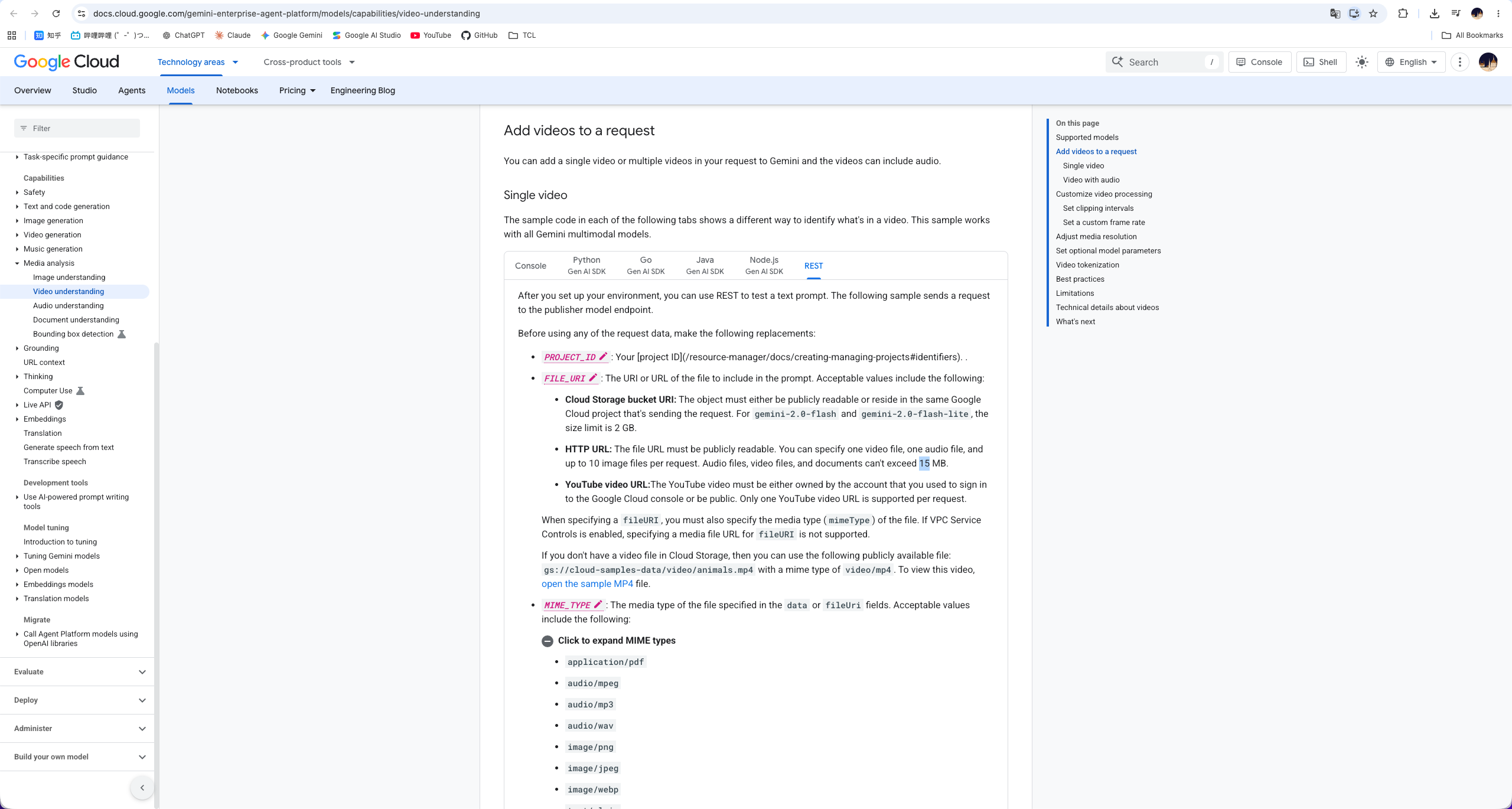
When using Google/Gemini models with HTTPS URL multimedia input, the publicly accessible file pointed to by the URL must be < 15 MB. Files exceeding 15 MB should be compressed or cropped first, or switched to the platform-supported base64 inline method.
Method B: Base64 Data URI
import base64

with open("photo.jpg", "rb") as f:
    b64 = base64.b64encode(f.read()).decode()

response = client.chat.completions.create(
    model="turing/gpt-5.4-mini",
    messages=[{
        "role": "user",
        "content": [
            {"type": "text", "text": "What is in this image?"},
            {
                "type": "image_url",
                "image_url": {"url": f"data:image/jpeg;base64,{b64}"}
            }
        ]
    }]
)
detail Control (OpenAI Models)
| Value | Behavior | Token Cost |
|---|---|---|
low | Low-resolution encoding (512×512 thumbnail) | 85 tokens (fixed) |
high | Original resolution + multiple patches | Hundreds to thousands of tokens |
auto (default) | Model chooses | Depends on image size |
Major Models Supporting Image Input
| Provider | Models |
|---|---|
| OpenAI | Refer to image-input markers in Model List → OpenAI |
| Anthropic | Refer to image-input markers in Model List → Claude; Claude supports up to 5 images per request; the Chat Completions protocol automatically converts image structure |
| Refer to image-input markers in Model List → Gemini | |
| Qwen | Refer to image-input markers in Model List → Alibaba |
| DeepSeek | deepseek-v4.1-flash (direct to DeepSeek's own API) and bytedance/deepseek-v4.1-flash (ByteDance Volcano Ark deployment) both natively support image input (the older experimental deepseek-v4-flash-vision-exp is discontinued). Public URLs are fetched by the upstream, which often fails on non-China hosts -- send base64 instead |
Video Input
Gemini (Base64 Data URI)
The Turing Platform currently only supports base64 inline for Gemini video input. The following methods are supported natively by the vendor but are not yet available on the platform (source: Gemini official documentation):
| Vendor-Supported Input Method | Max Size | Recommended Use Case |
|---|---|---|
| File API | 20 GB (paid) / 2 GB (free) | Large files (>100 MB), long videos (>10 min), reusable files |
| Cloud Storage | 2 GB (per file, no storage limit) | Large files, long videos, persistent reusable files |
| Inline data (base64) | < 100 MB | Small files (<100 MB), duration <1 min, one-time input ✅ Currently supported |
| YouTube URL | N/A | Public YouTube videos |
Gemini 3 Pro handles video clips directly. Encode the video as base64 and pass it as data:video/<mime>;base64,<data>:
import base64

with open("demo.mp4", "rb") as f:
    b64 = base64.b64encode(f.read()).decode()

response = client.chat.completions.create(
    model="turing/gemini-3-pro-latest",
    messages=[{
        "role": "user",
        "content": [
            {"type": "text", "text": "Summarize the experimental steps mentioned in the video into 5 key points."},
            {
                "type": "image_url",
                "image_url": {
                    "url": f"data:video/mp4;base64,{b64}",
                    "mime_type": "video/mp4"
                }
            }
        ]
    }],
    extra_body={"thinkingConfig": {"includeThoughts": True}},
    stream=True,
)
curl -N $TURING_BASE_URL/chat/completions \
  -H "Authorization: Bearer $TURING_API_KEY" \
  -H "Content-Type: application/json" \
  -d '{
    "model": "turing/gemini-3-pro-latest",
    "messages": [{
      "role": "user",
      "content": [
        {"type": "text", "text": "Summarize the experimental steps mentioned in the video"},
        {
          "type": "image_url",
          "image_url": {
            "url": "data:video/mp4;base64,{{VIDEO_BASE64}}",
            "mime_type": "video/mp4"
          }
        }
      ]
    }],
    "stream": true
  }'
Recommendations:
- Format: MP4 (H.264) or MOV
- Size: Base64 string < 32 MB
- Duration: Recommended < 10 minutes (longer content should be trimmed or sampled by keyframe)
Qwen Omni (Video Frame Array)
The Qwen Omni series represents video as a frame array — extract frames from the video as a sequence of images:
{
  "model": "qwen-omni-turbo-latest",
  "messages": [{
    "role": "user",
    "content": [
      {"type": "text", "text": "What does this video show?"},
      {"type": "image_url", "image_url": {"url": "data:image/jpeg;base64,..."}},
      {"type": "image_url", "image_url": {"url": "data:image/jpeg;base64,..."}},
      {"type": "image_url", "image_url": {"url": "data:image/jpeg;base64,..."}}
    ]
  }]
}
Frame extraction recommendation: 5–30 FPS, sampling at scene changes.
Qwen Visual Understanding (video_url)
Qwen visual understanding models use a video_url content block to pass a complete video. Model names do not include the turing/ prefix.
Supported models are the Qwen variants with video input / visual understanding capability listed in Model List → Alibaba.
Parameters:
fps: Frame extraction rate, range[0.1, 10], default2.video_url.url: HTTPS URL or base64 data URI (data:video/mp4;base64,...).- Token estimate: Approximately
h × w / (32 × 32) + 2tokens per frame.
Request Examples
- cURL
- Python
- Python (base64)
curl -N $TURING_BASE_URL/chat/completions \
  -H "Authorization: Bearer $TURING_API_KEY" \
  -H "Content-Type: application/json" \
  -d '{
    "stream": true,
    "model": "qwen-vl-max-2025-08-13",
    "messages": [{
      "role": "user",
      "content": [
        {"type": "text", "text": "You are a video content analysis expert. Identify speakers, scenes, and key events, and output them as a structured list."},
        {"type": "video_url", "video_url": {"url": "https://example.com/sample.mp4"}, "fps": 2}
      ]
    }]
  }'
from openai import OpenAI

client = OpenAI(api_key=TURING_API_KEY, base_url=TURING_BASE_URL)

stream = client.chat.completions.create(
    model="qwen-vl-max-2025-08-13",
    stream=True,
    messages=[{
        "role": "user",
        "content": [
            {"type": "text", "text": "Identify speakers, scenes, and key events, and output them as a structured list."},
            {
                "type": "video_url",
                "video_url": {"url": "https://example.com/sample.mp4"},
                "fps": 2,
            },
        ],
    }],
)
for chunk in stream:
    delta = chunk.choices[0].delta.content
    if delta:
        print(delta, end="", flush=True)
import base64
from openai import OpenAI

client = OpenAI(api_key=TURING_API_KEY, base_url=TURING_BASE_URL)

with open("clip.mp4", "rb") as f:
    b64 = base64.b64encode(f.read()).decode()

resp = client.chat.completions.create(
    model="qwen3-vl-plus",
    messages=[{
        "role": "user",
        "content": [
            {"type": "text", "text": "Break the video into chapters and write a topic summary for each"},
            {
                "type": "video_url",
                "video_url": {"url": f"data:video/mp4;base64,{b64}"},
                "fps": 1,
            },
        ],
    }],
)
print(resp.choices[0].message.content)
Doubao Seed 2.0 (video_url block)
The Doubao Seed 2.0 series (pro / lite / mini) supports video understanding using a dedicated video_url content block. Two input methods are supported: base64 (local files) and public URLs.
Key Limitations
- File size ≤ 50 MB; request body in base64 mode ≤ 64 MB
- MP4 (H.264) encoding recommended; the MIME type in the data URI must match the actual format (e.g.,
data:video/mp4;base64,…) - Frame extraction rate range: 0.2–5 fps, default 1 fps; audio tracks in the video are not included in understanding
- Model names do not include the
turing/prefix; refer to the Doubao Seed 2.0 series in Model List → ByteDance for specific model names - Public URLs must be accessible from overseas servers (inference runs outside China); use base64 for domestic private addresses
Method A: Base64
- cURL
- Python
BASE64_VIDEO=$(base64 -i video.mp4 | tr -d '\n')

curl $TURING_BASE_URL/chat/completions \
  -H "Authorization: Bearer $TURING_API_KEY" \
  -H "Content-Type: application/json" \
  -d "{
    \"model\": \"doubao-seed-2-0-pro-260215\",
    \"messages\": [{
      \"role\": \"user\",
      \"content\": [
        {\"type\": \"video_url\", \"video_url\": {\"url\": \"data:video/mp4;base64,$BASE64_VIDEO\"}},
        {\"type\": \"text\", \"text\": \"Please describe the main content of the video\"}
      ]
    }]
  }"
import base64
from openai import OpenAI

client = OpenAI(api_key=TURING_API_KEY, base_url=TURING_BASE_URL)

with open("video.mp4", "rb") as f:
    b64 = base64.b64encode(f.read()).decode()

response = client.chat.completions.create(
    model="doubao-seed-2-0-pro-260215",
    messages=[{
        "role": "user",
        "content": [
            {"type": "video_url", "video_url": {"url": f"data:video/mp4;base64,{b64}"}},
            {"type": "text", "text": "Please describe the main content of the video"},
        ],
    }],
)
print(response.choices[0].message.content)
Method B: Public URL
curl $TURING_BASE_URL/chat/completions \
  -H "Authorization: Bearer $TURING_API_KEY" \
  -H "Content-Type: application/json" \
  -d '{
    "model": "doubao-seed-2-0-pro-260215",
    "messages": [{
      "role": "user",
      "content": [
        {"type": "video_url", "video_url": {"url": "https://example.com/sample.mp4"}},
        {"type": "text", "text": "Please describe the main content of the video"}
      ]
    }]
  }'
A request with only
video_urland notextis also valid — the model will automatically provide an overall description. Addingtextguides the model toward a specific task. For Doubao Seed 2.0 reasoning capabilities (reasoning_effort), see Thinking & Reasoning / Doubao.
Audio Input
GPT-4o Audio
import base64

with open("speech.wav", "rb") as f:
    audio_b64 = base64.b64encode(f.read()).decode()

response = client.chat.completions.create(
    model="turing/gpt-4o-audio-preview",
    modalities=["text", "audio"],
    audio={"voice": "alloy", "format": "wav"},
    messages=[{
        "role": "user",
        "content": [
            {"type": "text", "text": "Please transcribe this audio first, then answer."},
            {
                "type": "input_audio",
                "input_audio": {"data": audio_b64, "format": "wav"}
            }
        ]
    }]
)
Supported formats: wav, mp3, flac, opus, pcm16.
Qwen Omni
qwen-omni-turbo-latest supports both audio input and audio output (synchronously returning wav). Audio output is controlled via modalities: ["text", "audio"] and audio.voice (available voices include Cherry, Serena, etc.).
{
  "model": "qwen-omni-turbo-latest",
  "modalities": ["text", "audio"],
  "audio": {"voice": "Cherry", "format": "wav"},
  "messages": [{
    "role": "user",
    "content": [
      {"type": "text", "text": "Answer the question in the audio"},
      {"type": "input_audio", "input_audio": {"data": "...", "format": "wav"}}
    ]
  }]
}
File Input
Files (e.g., PDFs) are passed as inline Base64 using the Responses protocol's input_file content block — note this differs from the Chat Completions protocol used in the rest of this page.
import base64
from openai import OpenAI

client = OpenAI(
    api_key="your-api-key",
    base_url="https://live-turing.cn.llm.tcljd.com/api/v1",
)

with open("report.pdf", "rb") as f:
    b64 = base64.b64encode(f.read()).decode()

response = client.responses.create(
    model="turing/gpt-5.4",
    input=[{
        "role": "user",
        "content": [
            {
                "type": "input_file",
                "filename": "report.pdf",
                "file_data": f"data:application/pdf;base64,{b64}",
            },
            {"type": "input_text", "text": "Summarize the three key points of this report"},
        ],
    }],
)

print(response.output_text)
- Only models that support both text and image input simultaneously can process PDFs: parsing includes both the text and page images of each page in the context, which significantly increases token consumption.
- Inline request bodies are subject to size limits; split or compress large files before sending.
Supported file types vary by model: PDF, DOCX, PPTX, images, etc.
Provider Capability Quick Reference
| Capability | OpenAI | Anthropic | Gemini | Qwen | Doubao Seed 2.0 |
|---|---|---|---|---|---|
| Image URL | ✅ | ✅ (SDK auto-converts to base64) | ✅ (public file < 15 MB) | ✅ | ✅ |
| Image base64 | ✅ | ✅ | ✅ | ✅ | ✅ |
detail: low/high | ✅ | ✅ (via image.source) | ⚠ auto only | ✅ | ❌ |
| Video (base64 data URI) | ❌ | ❌ | ✅ (image_url + mime_type, Gemini 2.5+/3.x) | — | ✅ (video_url) |
| Video (frame array) | ❌ | ❌ | ❌ | ✅ (Omni, multiple image_url) | ❌ |
Video (video_url, optional fps) | ❌ | ❌ | ❌ | ✅ (VL/qwen3-vl/qwen3.5+/qwen3.6+) | ✅ |
| Video frame extraction rate | — | — | Automatic | VL: fps field [0.1, 10], default 2; Omni: client-side extraction | 0.2–5 fps (default 1) |
| Audio input | ✅ (gpt-4o-audio) | ❌ | ✅ (Gemini 2.5+/3.x, image_url + mime_type) | ✅ | ❌ (audio tracks in video also excluded) |
| File (PDF, base64) | ✅ (Responses input_file, vision models only) | — | — | — | — |
Best Practices
- Prefer streaming: Multimodal requests have large contexts and slow generation; enabling
stream: truesignificantly reduces time to first token - Use base64 + compression for large files: Resize images, reduce video resolution
- Be explicit in prompts: "Summarize the chapter structure of the video" or "Compare the differences between these two images" is far better than "describe this"
- Constrain output format: Requesting JSON or bullet lists reduces post-processing
- Multiple images/videos: Combine them in the same
contentarray; the model automatically associates context - Ensure image URLs are accessible overseas: Use base64 for domestic addresses
- Google URL file size: Multimedia files via public URL for Gemini/Google must be < 15 MB; compress, split, or switch to base64 if exceeded
Parameter Reference
/api/create-chat-completion—messages.content[]structure,modalities,audio/api/create-message— Claude'scontent[].sourcestructure/api/create-response— Responses protocolinput[].content[](input_text/input_image/input_file)
Billing Impact
Images are billed by token (depending on resolution and model); video is calculated by duration + resolution; audio is billed by seconds (input and output billed separately). See Billing & Usage for details.
FAQ
- Image URL timeout → Switch to base64 or use a CDN (must still be accessible from overseas)
- Google/Gemini URL input rejected → Check whether the public file is < 15 MB; compress, crop, or split if over the limit
- Gemini video too large → Split into segments or reduce resolution
- GPT-4o Audio returned no audio → Check that
modalities: ["text", "audio"]is fully specified - Qwen Omni poor multi-frame recognition → Increase frame extraction rate to 10+ FPS
- Claude image token cost higher than expected → Images are automatically upscaled to 1568×1568; pre-compress to 1024 or below
See also
- Streaming Response — Strongly recommended for multimodal requests
- Image Generation — Output images (not input)
- Video Generation — Output video
- Realtime Voice — Bidirectional voice conversation
- Billing & Usage — Token calculation rules for images / video / audio